Showing posts with label Technology. Show all posts

Friday, January 16, 2015

Newsela!!! Current Events Lexiled and all!!

Hi everyone!!! Nicole here from All Things Apple to share an A.M.A.Z.I.N.G. website today!!! A good friend of mine shared this site with me this week, and I am seriously obsessed with it!! With the need for more nonfiction texts and practice, this website is quite frankly a gem!!

Welcome to Newsela!!!


Ok, so you may be asking, what's so great about this website? Well, let me answer that for you!
1. The articles are all on current events. You receive a daily email with new current events articles as well. You can read them online OR print them out in a very nice layout!!! So VERSATILE!!!
2. Each article has up to 4 different Lexile Levels to choose from for students!!! OH MY WORD!! Awesome!!! DIFFERENTIATION!! Once you set up your class, it will automatically select the grade level appropriate Lexile Level for the article chosen. However, you can still pick a different level if necessary. So far, the lowest Lexile Level I have come across was in the 300s.
3. After you've set up your class, you can assign specific articles. You can even hide articles you don't want them to read. Many of the articles have quizzes along with them too. You are able to track everything as well!
4. You can have your students sign up with the classroom code, and this allows them to go to the Binder to read the assigned articles.
5. ANNOTATION!!! You and your students can annotate text by simply highlighting sections with your cursor and clicking on a highlighter color. You can even write notes with the annotation!!! AND the teacher can respond to the comments!!! WOW, right?!?
So basically, you MUST GO CHECK THIS OUT!! :) I'm so excited to get my kids going with this website!!! I may even use it during Literature Circles!!

Have you ever used this website before?? If you have, how have you used it in your own classroom? We would love to know!!

Hope you all enjoy this!!! Make sure to visit me over at my blog, All Things Apple (formerly All Things Apple in 2nd :)!!

Nicole :)


Monday, August 25, 2014

Organizing for 21st Century Students

Hi everyone!!! How are ya'll doing?? I don't know about you, but I'm still tired after 4 weeks of school!!! haha This is our 5th week so you'd think I'd be back into the swing of things...NOPE! :) I'm always a work in progress, and that's how I like it! I always feel that if I get to the point that I think I have nothing more to do, then it's time for me to find a new profession! That's part of what I LOVE about teaching! Nothing is ever the same! I enjoy finding new ideas, trying them out, tweaking them, and making them my own. So I guess I will continue being a work in progress!

So, if you are anything like me, you are always trying to find better and more efficient ways to organize your classroom. Well, this organization doesn't just apply to papers, activities, desks, etc. This goes into my classroom technology! With technology being so necessary (not take over the teacher necessary:), I want to make sure I create a space that works for my students and me.

Leading to...


If you'd like to know all about how I organize my devices as well as apps and tips, from the set-up to the apps used, head over to my blog post, iPad Organization 101 +Apps. 

Wishing everyone a wonderful start to the new year (if it's new right now for you :)!!
Happy organizing!!!! 
Nicole :)


Thursday, July 17, 2014

Word Up! A Word Cloud Symbaloo Board

Word Cloud Generators have been around since the dawn of the wireless modem (that's a really long time in tech years).  Kids and teachers love them because they're quick and easy to integrate and look pretty.  That's right, I said pretty.  

The only way to make them better would be to put them in an accessible place that everyone could reach.  Drumroll, please................I put together a Symbaloo board with 12 world-renowned word cloud generators. 


Now your students (or you) can pick which one they'd like to use.  Some of these are new to myself, but you've got the classics like Tagxedo, Wordle, ABCya.  There's some newbies that you might not have ever heard of--so check those out too.

Take some time, bookmark this for the new year, and get your kids creating.  
A couple of ideas for using word cloud generators include:
  • Poetry unit: Pick a poem and insert the words.
  • All about Myself:  Students write words they think will describe them the best (great for beginning of the year, get-to-know-you).
  • Adjectives, Nouns, & Verbs:  Lot of choices here describe rooms, objects, people, subject areas, and more.
  • Character Traits from Novels:  Pick a character and write about his traits.
  • Parent Gift:  Students describe parents/guardian and then print it out (include frame if possible). 
  • Create class posters
  • Class list, let everyone get a copy too. 
  •  Social Studies:  Historical characters and their significance.

Here is a quick on I used with Word Mosaic.  
I kind of like it.  It is pretty (and totally me).


BarCATlounger totally thinks you check this out.


Tuesday, July 8, 2014

"Let's Get Visual! Visual!" --Visual Literacy Through QR Code Breaking and a Freebie!


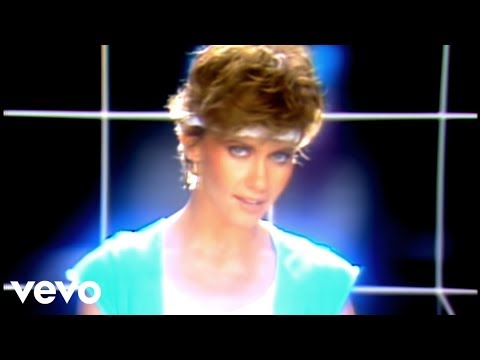
Are you old enough to know who this is?

This blog post title should be read/sung to the tune of Olivia Newton-John's 1981 super-smash single "Physical".  

Originally, Olivia wanted the title of the song "Physical" to be "Visual"--you see she understood the importance of visualizing, comprehending, and making inferences in educational settings.  The problem was her record label didn't totally agree--so she changed it to "Physical" and the rest is history.  True story, I swear.  Which brings us full circle to one of my favorite ways to learn--Using Visual Literacy to access understanding of what we see!

"Let's get Visual!  Visual!"  See, now the song is stuck in your brain and it's become a mind-bottling sensation for visual literacy.

Images (film, video, photos, signs, yada, yada, yada) are all around us.  They inundate us, tell us stories, and crave our attention.  BUT so many times we (and the students) don't understand the meanings behind them.  There's tons of reasons why (too difficult, it takes time and practice, patience, limited prior knowledge, where do we begin).  The bottom line is this: understanding, questioning, and making sense of images is a key skill that students need.  Not just in school, but in real life--but it's a skill they need to practice.

Would any of us be able to put together an IKEA chair and desk without the assistance of a little visual instructional fortitude?  I think not.


I love this quote (and I'm not even a quote guy).
                                                                                    leeandlowbooks.files.wordpress.com

Think about those kids you call "troublesome"  or the ones that I call "street smart".  Their ability to understand using visual literacy (and quickly take stock of their surroundings) are the kids that have it and use it the best.  That doesn't mean they always make the correct decisions BUT they pick up on cues, ask questions, and make guesses/predictions better than many of our "model" students based on my years of working with kids.  One of the reasons for this is because those students have been ingrained with the idea that they must adapt or be left behind.  They had to figure out how to navigate or they'd get left behind. But I digress...


Thinking about visual literacy makes me go back to Pinterest (I'm making a connection).  
Why do we love it?  PICTURES--immediate understanding, relating, making connections! 
How many of us are visual learners? Yup, I am.
Are we building that same base for our students?  Probably, but we could always be doing more.

                                                             http://etec.ctlt.ubc.ca/510wiki/images/b/bc/Visual_literacy.jpg

So you're probably asking me: "Matt, how can you help me out because I'm getting real tired of you going on and on about this visual lit stuff."  Well, I got you covered because I'm giving you another QR Code Breaker Freebie for Visual Literacy. Insert Oprah's "And You Get A Car" speech here.
                                             

A couple of weeks ago I created a QR Code Breaker for Read Aloud Books (find it here).  Now I've made this freebie for improving visual literacy skills using pictures and images on the QR Codes.  After scanning in the codes the students will see an image and they'll have to answer questions specific to the image that are on the worksheet. See the examples 
below.


The QR Code links to an interesting image that students must decipher/decode/understand for themselves.  Each page has four questions that vary from who, what, where, when, and why (and how) to redrawing the image, pulling vocabulary terms out, making connections, and questioning the importance, and more.  In this file you'll find five worksheets to try with your students.

So, go download this freebie and see what you think.  This is a quick and fun activity to get students thinking about exactly what they're seeing (or aren't seeing).  It's also an excellent way to create discussion in the classroom about what each individual student takes from seeing each image.  We all see from different angles and those differences can help foster a better understanding of images we see every day.

**Don't have tech?  No problem.  You can do this same thing by picking out images from newspapers, magazines, or graphics around the room.  Then have the students answer questions that aren't just "yes or "no".  Make them tell you why.  Make them explain how they know.  


So run, don't walk!  Get yourself a copy to try out.  
If you like it check out a couple of my other QR Code Adventures.


If you want to see more stop over and visit me at Digital: Divide & Conquer.  
It's a total party over there.  I mean--it is just crazy.
Come join my Wolfpack.